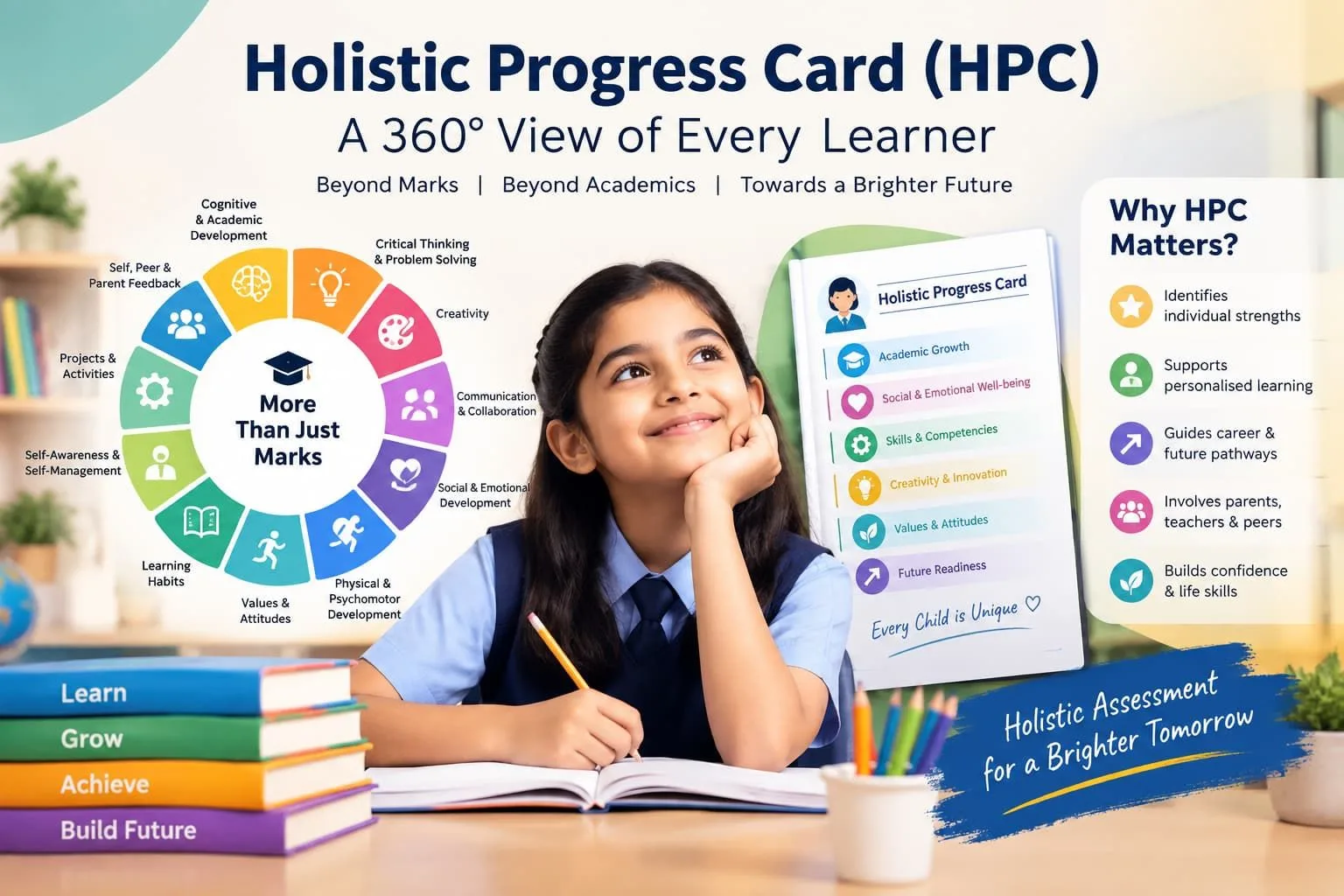

Key Takeaways
- An HPC school portal digitises competency tracking and cuts the manual workload of Holistic Progress Cards.
- Must-have features: activity logging, competency mapping, parent access and AI-assisted report drafting.
- AI support turns scattered classroom observations into structured HPC entries that teachers review and approve.
Implementing the Holistic Progress Card (HPC) is about more than simply moving from paper to digital. Teachers need an easy way to record observations, track competencies, monitor student progress, and share meaningful updates with parents.
A school portal for HPC implementation brings these tasks together in one place, making assessment and progress tracking more organised and manageable.
But technology is only part of the solution. Successful HPC implementation also depends on the right assessment approach, teacher training, clear competency insights, and ongoing support.
HPC School Portal
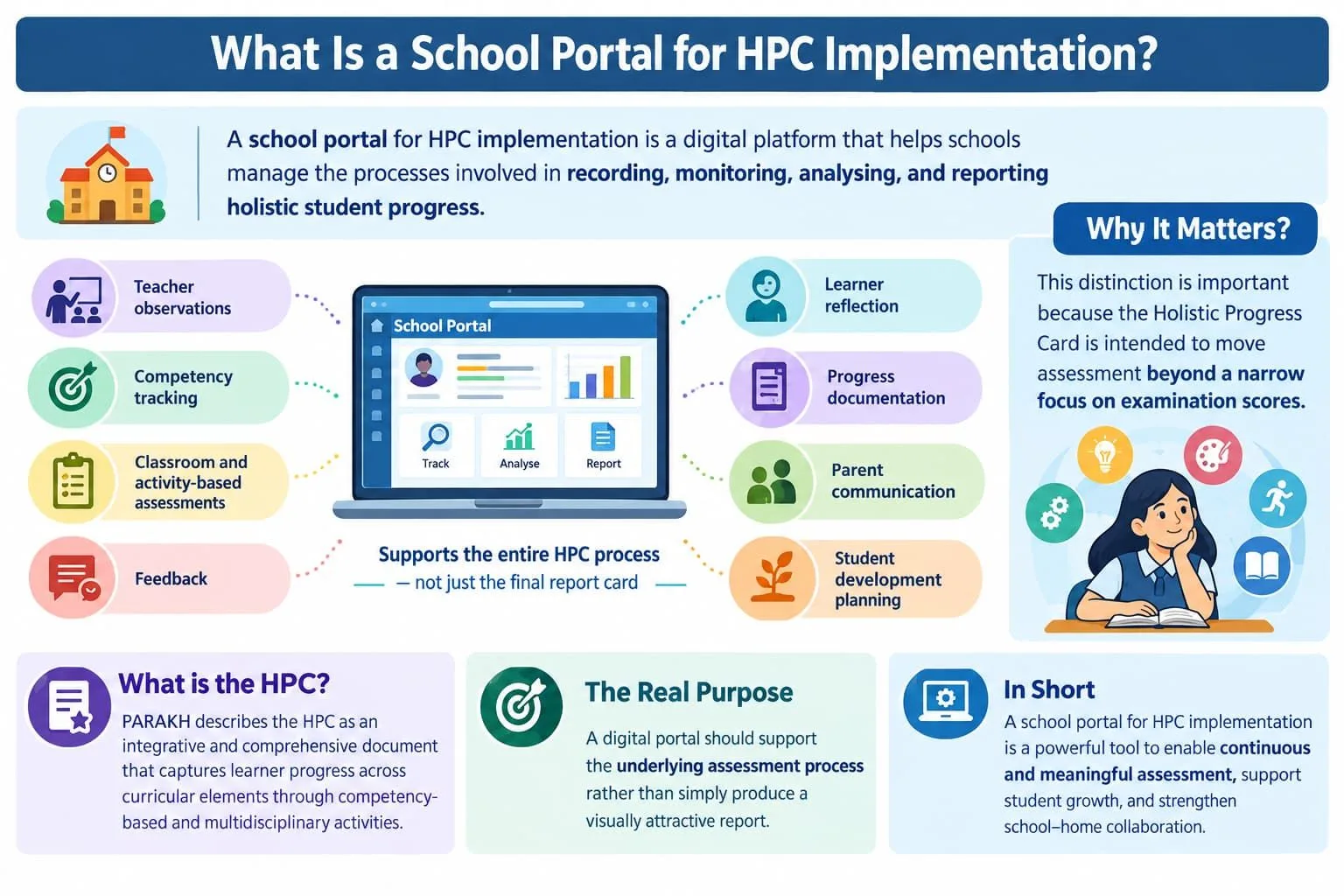
A school portal for HPC implementation is a digital platform that helps schools manage the processes involved in recording, monitoring, analysing, and reporting holistic student progress.
The purpose is not merely to digitise the final progress card. A useful portal should support the activities that happen before the report is generated, including:
• Teacher observations • Competency tracking • Classroom and activity-based assessments • Feedback • Learner reflection • Progress documentation • Parent communication • Student development planning
This distinction is important because the Holistic Progress Card is intended to move assessment beyond a narrow focus on examination scores.
PARAKH describes the HPC as an integrative and comprehensive document that captures learner progress across curricular elements through competency-based and multidisciplinary activities.
A digital portal should therefore support the underlying assessment process rather than simply produce a visually attractive report.
Why Schools Need an HPC Portal?
Schools need a digital portal for HPC implementation because holistic assessment can involve a large amount of information that becomes difficult to organise when it is maintained across separate registers, spreadsheets, documents, and informal teacher notes.
A teacher may need to record observations from classroom activities, projects, group work, assessments, student reflections, and other learning experiences.
When these records remain scattered, several challenges can arise:
• Information becomes difficult to retrieve. • Teachers spend time repeating documentation. • Progress across different periods becomes harder to compare. • School leaders have limited visibility into assessment practices. • Parents receive information only after the reporting cycle. • Important learner observations may be overlooked. • Competency development may not be connected with classroom evidence.
A centralised portal can provide a common structure for collecting and organising this information.
The goal, however, should be less administrative friction rather than more digital paperwork.
Expert Tip
Before selecting an HPC portal, schools should map their existing assessment workflow on paper. A technology platform should simplify that workflow instead of forcing teachers to follow an unnecessarily complicated process.
Key Features of an HPC School Portal
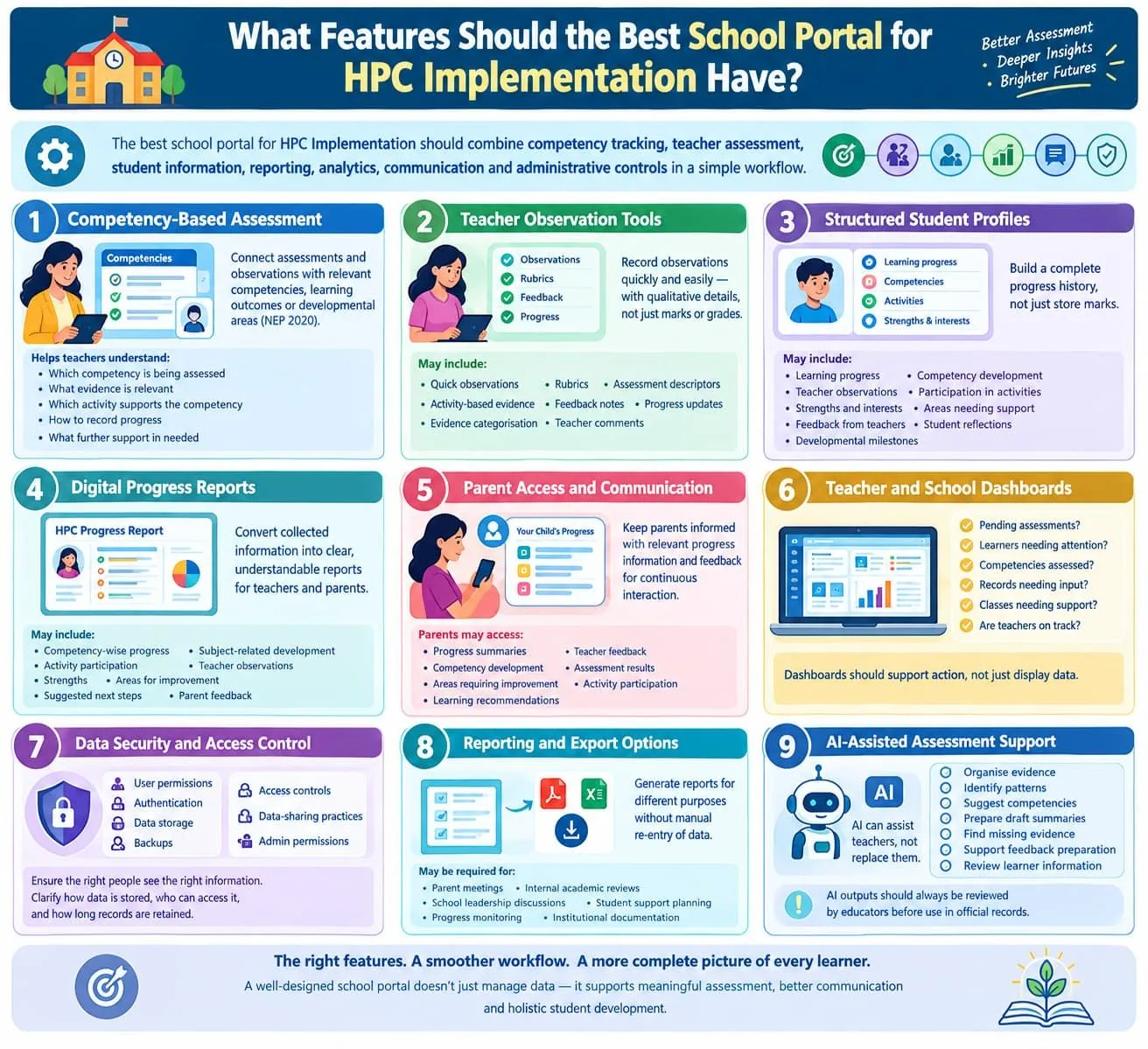
The best school portal for HPC implementation should combine competency tracking, teacher assessment, student information, reporting, analytics, communication, and administrative controls in a simple workflow.
Not every school needs the same configuration, but the following features should be considered.
1. Competency-Based Assessment
The portal should allow schools to connect assessments and observations with relevant competencies, learning outcomes, or developmental areas.
This is particularly important because HPC is connected with the broader shift toward competency-based education and assessment under NEP 2020.
A useful system should help teachers understand: • Which competency is being assessed • What evidence is relevant • Which activity supports the competency • How progress can be recorded • What further support the learner may need
Competency mapping should not become an additional administrative burden. It should help teachers understand student development more clearly.
2. Teacher Observation Tools
Teachers should be able to record observations without navigating through multiple complicated screens.
A good system may support: • Quick observations • Rubrics • Assessment descriptors • Activity-based evidence • Feedback notes • Progress updates • Evidence categorisation • Teacher comments
The easier this process becomes, the more likely teachers are to use the system consistently.
The portal should also allow teachers to record meaningful qualitative information rather than limiting assessment to marks, grades, or fixed numerical scores.
3. Structured Student Profiles
Each learner should have a structured profile containing relevant academic and developmental information.
The objective should be to build a progress history, not merely store marks.
Depending on the school's requirements, a student profile may include: • Learning progress • Competency development • Teacher observations
• Participation in activities • Strengths and interests • Areas requiring support • Feedback from teachers • Student reflections • Developmental milestones
A complete student profile can help teachers and parents view the learner as a whole rather than focusing only on examination performance.
4. Digital Progress Reports
The portal should convert collected information into clear progress reports.
Reports should be understandable to teachers and parents rather than being designed only for administrative use.
A meaningful digital HPC report may include: • Competency-wise progress • Subject-related development • Activity participation • Teacher observations • Strengths • Areas for improvement • Suggested next steps The report should communicate a learner's development in a clear and constructive way.
5. Parent Access and Communication
Parent participation is an important part of holistic assessment.
NEP-related government material describes the redesigned progress card as a link between home and school and highlights the importance of parent-teacher interaction in supporting holistic development.
A digital portal can make this interaction more continuous by allowing authorised parents to view relevant progress information and feedback.
Depending on the platform, parents may be able to access:
• Progress summaries • Teacher feedback • Competency development • Assessment results • Areas requiring improvement • Activity participation • Learning recommendations The objective should not be to overwhelm parents with data. Instead, the portal should translate assessment information into clear and useful insights about the learner.
6. Teacher and School Dashboards
Teachers and school administrators should be able to see pending assessments, completed records, learner progress, and areas requiring attention.
A useful dashboard should answer practical questions quickly: • Which assessments are pending? • Which learners need attention? • Which competencies have been assessed? • Which records still require teacher input? • Which classes need additional support? • Are teachers following the agreed assessment workflow?
Dashboards should support action rather than simply display large amounts of information.
7. Data Security and Access Control
Student information is sensitive, so schools should carefully evaluate: • User permissions • Authentication • Data storage • Backups • Access controls • Data-sharing practices • Administrative permissions
Teachers should see the information required for their responsibilities, while administrators should have appropriate oversight without creating unnecessary access.
Schools should also clarify how student data is stored, who can access it, and how records are retained.
8. Reporting and Export Options
Schools may need to generate reports for different purposes.
The platform should therefore provide appropriate export and reporting functionality without requiring staff to manually recreate information in another system.
Reports may be required for: • Parent meetings • Internal academic reviews • School leadership discussions • Student support planning • Progress monitoring • Institutional documentation
9. AI-Assisted Assessment Support
AI features can support HPC implementation when they are designed to assist teachers rather than replace them.
Useful AI-enabled functions may include: • Organising assessment evidence • Identifying patterns in progress • Suggesting relevant competencies • Preparing draft summaries • Identifying missing evidence • Supporting feedback preparation • Helping teachers review learner information
AI outputs should always be reviewed by educators before they are used in official student records.
How an HPC Portal Helps Teachers?
A digital HPC portal can help teachers by reducing repetitive documentation and making learner-progress information easier to record, organise, retrieve, and review.
This matters because holistic assessment can generate evidence from multiple classroom experiences.
A portal can act as a teacher's working environment rather than merely an administrative database.
For example, a teacher could record an observation immediately after a classroom activity instead of trying to remember the learner's performance weeks later.
This can make assessment evidence more timely and potentially more meaningful.
A well-designed system can also help teachers compare progress over time, identify learners who need support, and prepare more useful conversations with parents.
However, the portal should be supported by clear assessment guidelines and practical teacher training.
How AI Supports an HPC School Portal?
AI can support HPC implementation by helping teachers organise assessment evidence, identify patterns, prepare summaries, and connect observations with relevant competencies, provided that educators remain responsible for final decisions.
AI may be useful for: • Organising classroom evidence • Tracking progress over time • Identifying missing observations • Suggesting activity ideas • Supporting rubric development • Preparing draft feedback • Creating preliminary learner summaries • Highlighting possible areas of support
TalentGro Global also provides AI-enabled tools such as a student self-assessment tool and a strength-finder tool. These tools can support schools in understanding student interests, strengths, and development areas as part of a broader learner-centred approach.
Such tools should be used to support reflection and informed educational planning. They should not be treated as automatic or final judgments about a child's abilities.
Expert Tip
If a school adopts AI-enabled assessment features, establish a simple rule:
AI can assist with organisation and recommendations, but teachers validate the evidence and make the final educational judgement.
How a School Portal Engages Parents?
A school portal can improve parent engagement by making student-progress information easier to understand and access throughout the academic cycle.
Traditional reporting often creates a situation where parents receive a concentrated snapshot of progress at the end of a term.
A more connected digital approach can support ongoing communication.
Parents may be able to view: • Progress summaries • Teacher feedback • Competency information • Activity participation • Learning recommendations • Areas requiring additional support
The portal should use clear language and avoid presenting assessment information in a way that creates unnecessary anxiety or confusion.
Parents should understand not only where the learner is currently performing, but also what the school is doing to support further development.
Teachers’ Role in Digital HPC
Teachers remain the most important part of HPC implementation because technology can organise assessment information, but it cannot replace professional understanding of individual learners.
A successful portal should therefore be designed around teacher workflows.
Teachers need to understand: 1. What competencies they are assessing 2. What evidence is relevant 3. How observations should be recorded 4. How performance should be interpreted 5. How feedback should be communicated 6. How assessment information should influence future teaching 7. How AI-generated suggestions should be reviewed
This is why teacher training should happen alongside technology implementation.
A school that purchases a sophisticated platform without preparing its teachers may end up digitising existing problems rather than solving them.
Why Teacher Training Matters for HPC?
Teacher training helps educators understand both the digital workflow and the principles of competency-based assessment.
Training should not be limited to a single demonstration session. Teachers may need support in understanding: • Competency-based assessment • Observation techniques • Rubric use • Digital assessment workflows • Student feedback • Parent communication • Data interpretation • Responsible use of AI • Competency mapping • Learner reflection
TalentGro Global supports schools with HPC implementation and faculty development through a structured combination of training, guidance, and practical implementation support.
TalentGro Global's trainer pool includes NCERT–PARAKH certified master trainers, who can help schools build faculty understanding of HPC principles and assessment practices.
This support can be particularly useful for schools that need to move from theoretical awareness to classroom-level implementation.
The strongest approach is to treat technology adoption and teacher development as two parts of the same implementation plan, rather than separate projects.
How TalentGro Global Supports HPC Implementation?
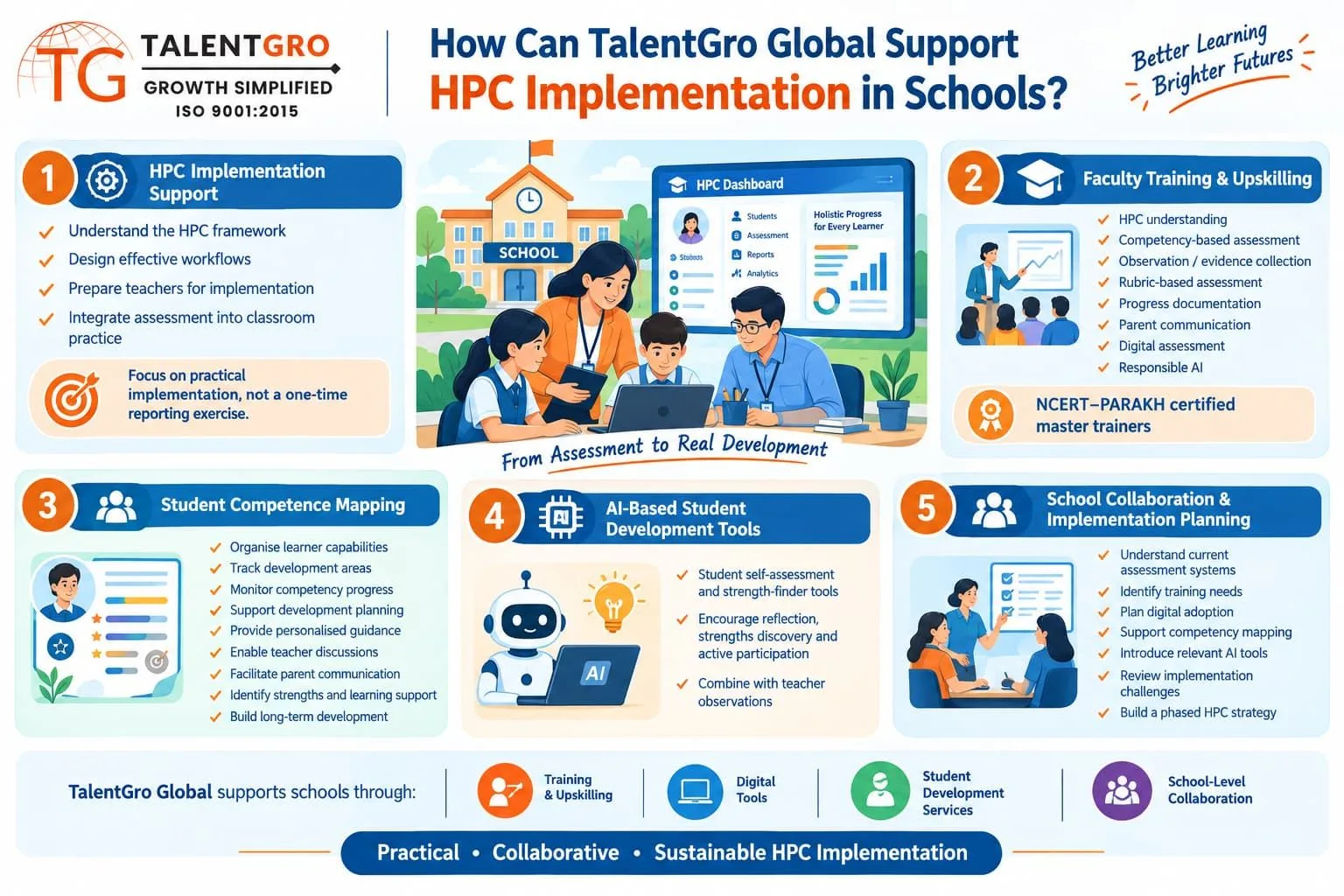
TalentGro Global works with schools to support the implementation of the Holistic Progress Card through a combination of training, digital tools, student development services, and school-level collaboration.
Its support can include the following areas.
HPC Implementation Support
Schools may need guidance in understanding the HPC framework, designing workflows, preparing teachers, and integrating assessment practices into everyday classroom activities.
TalentGro Global collaborates with schools to support the practical implementation of HPC rather than treating it as a one-time reporting exercise.
Faculty Training and Upskilling
Teacher readiness is essential for successful HPC adoption.
Through its pool of NCERT–PARAKH certified master trainers, TalentGro Global can support faculty development around: • HPC understanding • Competency-based assessment • Observation and evidence collection • Rubric-based assessment • Progress documentation • Parent communication • Digital assessment practices • Responsible use of AI
Student Competence Mapping
HPC implementation becomes more meaningful when schools understand the competencies and development areas of their students.
TalentGro Global provides student competence mapping services to help schools organise information about learner capabilities, development areas, and competency-related progress.
Competence mapping can support: • Student development planning • Personalised guidance • Teacher discussions • Parent communication • Strength identification • Learning support strategies • Long-term learner development
AI-Based Student Development Tools
TalentGro Global offers AI tools such as: • Student self-assessment tools • Strength-finder tools
These tools can encourage students to reflect on their learning, identify strengths, and participate more actively in their development.
When combined with teacher observations and school-level assessment practices, such tools can contribute to a more complete understanding of the learner.
School Collaboration and Implementation Planning
Every school has a different academic structure, faculty profile, technology environment, and assessment workflow.
TalentGro Global works collaboratively with schools to understand their requirements and align HPC implementation support with their existing processes.
This may include: • Understanding the school's current assessment system • Identifying teacher training needs • Planning digital adoption • Supporting competency mapping • Introducing relevant AI tools • Reviewing implementation challenges • Building a phased HPC strategy
The objective is to help schools develop a practical and sustainable HPC implementation process.
How Schools Can Implement an HPC Portal?
Schools should implement an HPC portal in stages, beginning with assessment requirements and teacher training before expanding to school-wide digital adoption.
Step 1: Understand the HPC Framework
School leaders should first understand the relevant HPC framework and identify which elements need to be supported digitally.
PARAKH has developed HPC-related frameworks for the Foundational, Preparatory, Middle, and Secondary stages. Schools should ensure that their chosen workflow matches the relevant stage.
Step 2: Map the Current Workflow
Document how teachers currently: • Assess students • Record observations • Store evidence • Provide feedback • Prepare reports • Communicate with parents • Track competency development
This reveals where technology can genuinely save time.
Step 3: Identify Competency and Training Needs
Before choosing a platform, schools should identify: • Which competencies need to be tracked • What evidence teachers currently collect • Where teachers need training • Whether students need self-assessment support • Whether competence mapping is required • How parents should receive progress information
This step helps schools avoid purchasing technology without a clear implementation plan.
Step 4: Select the Right Platform
Schools should compare platforms based on: • HPC alignment • Usability • Assessment capabilities • Competency mapping • Reporting • Security • Scalability • Integrations • Support • Training • AI transparency
The cheapest platform is not necessarily the most economical if teachers struggle to use it.
Step 5: Train Teachers
Training should cover both technology and assessment methodology.
Teachers need to understand not only where to click but also why they are collecting particular evidence.
Working with an experienced implementation partner such as TalentGro Global can help schools connect faculty training with the actual HPC workflow.
Step 6: Start With a Pilot
A small pilot can reveal practical problems before the portal is introduced across the entire school.
For example, the school could begin with selected classes, grades, or departments.
Step 7: Collect Teacher Feedback
Teachers should be asked: • Which steps save time? • Which steps are confusing? • What information is difficult to record? • Which reports are actually useful? • What additional training is required? • Are competency descriptions clear? • Are AI recommendations useful and understandable? Step 8: Expand Gradually
After the pilot has been reviewed, the school can refine the workflow and expand implementation.
This approach reduces disruption and gives teachers time to adapt.
What to Check Before Choosing an HPC Portal?
Schools should evaluate an HPC portal against usability, assessment alignment, security, reporting, teacher adoption, parent communication, scalability, and support.
Evaluation area Questions schools should ask
- HPC alignment − Does the platform support the school's applicable HPC framework?
- Teacher usability − Can teachers complete routine tasks quickly?
- Competency tracking − Can competencies and learning outcomes be mapped?
- Student profiles − Can the system maintain a meaningful learner progress history?
- Reporting − Can useful learner reports be generated?
- Parent access − Can information be shared clearly with authorised parents?
- Security − How is student data protected?
- AI capabilities − Are AI features transparent and teacher-controlled?
- Scalability − Can the platform support the entire school?
- Training − Is teacher onboarding available?
- Implementation support − Is practical HPC implementation guidance available?
- Integration − Can the system work with existing school processes?
- Analytics − Can schools identify useful progress patterns?
- Competence mapping − Can the school understand student strengths and development areas?
- Student tools − Are self-assessment and reflection tools available where appropriate?
Schools should request a live demonstration or pilot before making a long-term decision.
A product presentation can show what a platform is capable of; a pilot shows whether teachers can actually use it comfortably.
Common HPC Portal Implementation Mistakes
The most common HPC portal implementation mistakes are treating technology as the solution itself, providing insufficient teacher training, collecting excessive data, and focusing on reports rather than learner development.
Mistake 1: Digitising Paperwork
If teachers still perform the same repetitive work but now on a computer, the school has digitised administration rather than improved assessment.
Mistake 2: Ignoring Teacher Feedback
A portal designed without teacher input may look effective to administrators but become frustrating in real classrooms.
Mistake 3: Collecting Too Much Information
More data does not automatically mean better assessment.
Schools should collect information that has a clear educational purpose.
Mistake 4: Treating AI Recommendations as Final Decisions
AI-generated suggestions should be reviewed by educators.
Mistake 5: Focusing Only on Report Generation
The value of HPC lies in understanding learner progress, not merely producing a report at the end of a term.
Mistake 6: Skipping Teacher Training
Even a well-designed system can fail if teachers do not understand the assessment philosophy behind it.
Mistake 7: Ignoring Student Competency Insights
If schools collect assessment information without analysing student strengths, needs, and competencies, they may miss opportunities for personalised support.
Mistake 8: Introducing Too Many Tools at Once
Schools should introduce digital platforms, AI tools, self-assessment, and competence mapping in a phased manner so teachers and students can understand their purpose.
The Future of Digital HPC in India
Digital HPC is evolving toward systems that combine assessment evidence, learner development, teacher observations, and technology-assisted analysis rather than simply reproducing paper report cards online.
PARAKH's Digital HPC initiative and its discussions around technology and AI indicate growing attention to how digital systems can support holistic assessment.
For schools, this means digital HPC adoption should be viewed as an evolving process.
The technology will continue to change, but the underlying objective remains consistent:
Make assessment more meaningful, comprehensive, learner-centred, and useful for improving education.
The future of HPC implementation is likely to involve a combination of: • Digital assessment workflows • Teacher observations • Competency mapping • Student self-assessment • AI-assisted organisation • Faculty training • Parent engagement • Continuous learner development
Schools that combine these elements thoughtfully can build a stronger assessment culture.
Strengthen HPC With TalentGro Global
The best school portal for HPC implementation is not necessarily the platform with the longest feature list. It is the one that makes meaningful assessment easier for teachers and more useful for learners, parents, and school leaders.
Schools should begin with the educational objective, understand their assessment workflow, prepare teachers, and then select technology that supports those requirements.
Successful implementation may require more than software. It may also require: • HPC-focused faculty training • NCERT–PARAKH certified master trainers • Competency-based assessment guidance • Student competence mapping • AI-enabled self-assessment tools • Strength-finder tools • Parent communication strategies • School-level implementation support
TalentGro Global works with schools to bring these elements together through collaborative HPC implementation support, teacher development, student competency services, and technology-assisted learning tools.
As HPC implementation continues to evolve in India, the combination of competency-based assessment, teacher development, digital tools, responsible AI, competence mapping, and meaningful parent engagement can help schools move beyond report-card compliance toward a stronger culture of continuous learner development.
For schools considering this transition, the most useful next step is not only to ask, “Which software should we buy?”
Instead, schools should ask:
“What should better assessment look like in our school, and which implementation partner and technology can help our teachers achieve it?”

Content writing intern at TalentGro Global.
Frequently Asked Questions
Want to know more?
Reach out to our team any time